
Clean Architecture in React: Why Decoupling Your Business Logic is the Secret to Easily Testable Apps
A few years back, I was working on a fast-growing software platform. The company was scaling quickly, new developers were joining the team every single month, and our codebase was expanding rapidly.
We had a massive engineering challenge on our hands. We needed to build and scale new features, maintain an older legacy app written in AngularJS, migrate parts of that application to modern Angular, and somehow share core business logic between all of them.
It was a challenging...
As a software architect, I did what anyone would do. I started digging through online resources, tutorials, and articles looking for a structural blueprint to help us scale.
That is when I stumbled upon *Clean Architecture by Robert C. Martin (Uncle Bob).
It is one of the most popular books in software engineering history, but it is almost exclusively read in the back-end world.
For me, reading it was a massive eye-opener. It completely shifted how I think about and write software, regardless of the framework of choice.
But it also left me with a frustrating question: Why do we tend to ignore these architectural concepts when we build front-end applications?
The Tutorial Trap
Think about how most of us learn front-end development.
Every bootcamp, YouTube video, and documentation tutorial teaches us the framework. They teach us how hooks work, how to manage state, and how to handle routing.
They teach us how to use the tool, but they rarely teach us where our actual business logic belongs.
Because of this, we often fall into a natural pattern. A new developer joins a project, opens up a component file, and needs to fetch some data. So, they call an API directly inside the component. Then they need to validate a form or transform a data response, so they write that logic right next to the UI code.
It is incredibly easy to dive in, go wild, and build features at lightning speed in month one. But six months later, that single component is 1000 lines long. Nobody wants to touch it.
Adding a simple feature takes a week because everyone is terrified of what might break. There are no tests, because it is almost impossible to test it.
The truth is, nobody sets out to write bad code. We just default to putting things where they are easiest to reach. But when we mix all our business logic directly inside our components, we are basically borrowing time from our future selves. Eventually, that technical debt catches up, and our development speed grinds to a crawl.
Worse yet, it makes the application incredibly fragile and difficult to test. As software engineers, what we do carries a lot of responsibility—our code has real-world impact, and bugs can have serious financial or safety consequences. That is why thorough testing is so critical.
But if your business logic is trapped inside a UI component, writing clean, reliable tests becomes nearly impossible.
What is Clean Architecture
Clean architecture it's an opinionated way to structure your code. It is a layered architecture - you split your application into distinct, focused layers.
The core idea is simple: your business logic should not depend on your delivery mechanism and it should be completely testable.
In plain terms — the rules that govern your application, the things your product does — should be written in a way that doesn't care whether it's being run by React, or Vue, or a CLI, or a unit test.
Think about it this way. Imagine you could look at the folder structure of a codebase and immediately know what the app does. Not what it's built with. Not what tools it uses. What it does.
A library's blueprint tells you it's a library — you see reading rooms, stacks, a checkout desk. You know the intent before you read a single label.
Your codebase should do the same thing. Open it and you should see: product catalog, user authentication, order management. Not: hooks, utils, components, services.
Clean architecture gives you a way to get there.
The four Layers
Here is how this concept actually maps out in a real front-end codebase.
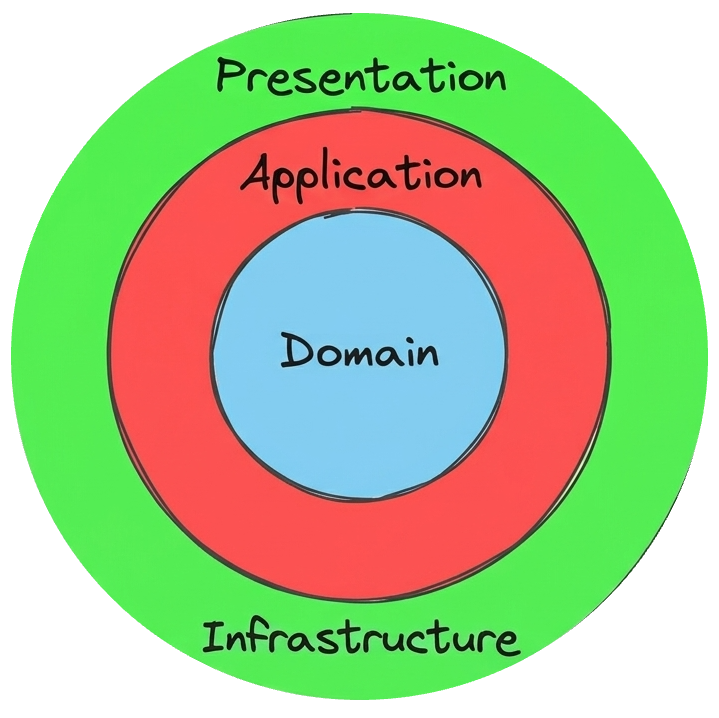
1. The Domain Layer (What your application is)
Think of this as your types, entities, and business rules in their purest form. No React. No API dependencies. No external libraries. If you extracted just this layer, another developer could read it and understand the entire business logic without knowing anything about your actual tech stack.
// core/domain/types/Product.ts
export type ProductStatus = 'draft' | 'published' | 'archived';

export interface Product {
  id: string;
  name: string;
  status: ProductStatus;
  price: number;
}

export function isAvailableForPurchase(product: Product): boolean {
  return product.status === 'published' && product.price > 0;
}
Notice that nothing in this file knows React exists. That's the point. If you switch your UI framework tomorrow, your core business rules stay exactly the same.
2. The Application Layer (What your application does)
This layer handles your use cases. It contains commands for write operations (like publishing a product or creating a user) and queries for read operations (like loading a product catalog). Each use case is completely self-contained. The application layer coordinates the workflow by talking to the Domain layer, but it depends purely on abstractions—not concrete implementations.
// core/application/queries/LoadProductQuery.ts
import type { Product } from '../../core/domain/types';
import type { IProductsAPIService } from '../boundaries';

export class LoadProductQuery {
  constructor(private readonly productsApiService: IProductsAPIService) {}

  async execute(id: string): Promise<Product> {
    const product = await this.productsApiService.fetchById(id);
    if (!product) throw new Error(`Product ${id} not found`);
    return product;
  }
}
Again, notice the complete absence of React imports.
And if you just look this code, can I run this code? Yeah, Absolutely!
Our code does not depend on ProductsAPIService directly, but on abstraction.
You can open up a test file, instantiate this class, inject a mock service, and run it, completley in isolation, even without internet connection.
3. Infrastructure — the how
This is where your real-world dependencies live. Your HTTP client, localStorage adapters, analytics wrappers, and third-party libraries all belong here.
The crucial distinction is that the application layer never imports these directly. Instead, the application layer defines an interface, a contract and the infrastructure layer fulfills it.
// core/application/boundaries
export interface IProductsAPIService {
  findById(id: string): Promise<Product | null>;
  findAll(): Promise<Product[]>;
}

// infrastructure/services/ProductsAPIService.ts
import { Product, ProductNotFoundError } from '../../core/domain/types';
import type { IProductsAPIService } from '../../core/application/boundaries';

export class ProductsAPIService implements IProductsAPIService {
  async fetchById(id: string): Promise<Product | null> {
    const res = await fetch(`/api/products/${id}`);
    if (!res.ok) throw new ProductNotFoundError(id);
    return res.json();
  }

  async fetchAll(): Promise<Product[]> {
    const res = await fetch('/api/products');
    return res.json();
  }
}
This is the boundary. The dependency inversion in practice. The inner layers define the shape of the data, while the outer layers provide the substance. At runtime, you simply inject the real implementation.
4. Presentation — React
This is your view layer: components, hooks, routing. In this setup, React simply consumes the application layer. It renders the results on screen and dispatches queries back down the line. That's it.
// hooks/useProduct.ts
import { useQuery } from '@tanstack/react-query';
import { LoadProductCommand } from '../../core/application/commands/LoadProductCommand';
import { container } from '../../infrastructure/container';

export function useProduct(id: string) {
  return useQuery({
    queryKey: ['product', id],
    queryFn: () => {
      const command = new LoadProductCommand(container.productsApiService);
      return command.execute(id);
    },
  });
}
The hook is thin. Almost no logic. It's a bridge between React and the application layer. The component consuming this hook has no idea how the data got there.
// components/ProductPage.tsx
import { useInjection, container } from '../container';

export function ProductPage({ id }: { id: string }) {
  // Do not depend on the concrete implementation, inject teh dependency
  const { useProduct } = useInjection(container);

  const { data: product, isLoading } = useProduct(id);

  if (isLoading) return <div>Loading...</div>;
  if (!product) return <ProductNotFound />;

  return (
    <div>
      <h2>{product.name}</h2>
      <p>{product.price}</p>
    </div>
  );
}
Notice how the component uses the command without actually knowing how it works under the hood.
That is exactly where dependency injection comes into play. It keeps our UI completely separated from our data sources, which makes testing incredibly simple. Because the layers are decoupled, you can easily mock the useProduct hook and test the component's UI states in total isolation.
There are quite a few different ways to handle dependency injection in a front-end app, and I will break down those specific techniques in a follow-up post.
What this actually changes
Structuring your app this way might seem like extra boilerplate at first, but it completely changes how your codebase handles change.
Imagine you need to migrate your app from a REST API to GraphQL. In a standard codebase, your fetch logic is scattered across dozens of UI components. You have to touch everything, your tests break, and it turns into two weeks of careful surgery. In a layered codebase, you simply swap out ProductsAPIService for a GraphQLProductsService. Your commands, hooks, and components stay exactly the same. Even your tests still pass, because they were testing the commands with a mock repository, not the actual network layer.
The same benefit applies to code reuse. If you ever need to share business logic with a Node.js backend or a CLI tool, you can. In a standard codebase, your logic is trapped inside React components. In a layered codebase, your commands are entirely framework-agnostic. You just inject a Node-compatible infrastructure layer, and it works out of the box.
Finally, consider unit testing. Instead of mocking fetch and rendering heavy components inside a simulated browser environment like JSDOM, you are testing pure TypeScript classes with simple mocks. It is incredibly fast, isolated, and completely reliable.
When not to use this
To be fair, you don't always need this level of architecture. If you are building a three-page marketing site, setting up these layers is textbook over-engineering. Just write the logic directly inside the component and ship it.
But if your codebase is going to grow, if a team is going to expand, if your API is bound to evolve, or if you ever want tests that run in milliseconds—the question isn't whether you need architecture. The question is when you will end up paying for not having it.
The cost always comes due; the only variable is when.
Don't over-engineer it either. You don't need to wrap every single tiny dependency in an interface from day one. Apply the pattern where the complexity actually warrants it. Protect the core business rules that earn the protection, and let the rest of your app stay simple.
Last updated on Sat May 30 2026